
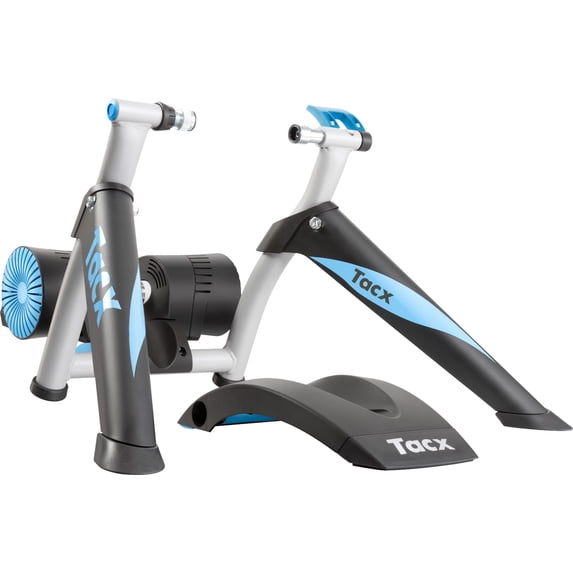
Your needs, this model
Does it fit your priorities?
Does the Tacx Genius Smart T2080 automatically change resistance?
Yes. Garmin describes Genius as an app-controllable motor-brake trainer and lists T2080 among legacy Tacx Training models. Its virtual flywheel and downhill-drive features are model-specific; check whether your exact app, device and software version still supports the workout you want.
Explore this need in the finder →Is Genius T2080 direct drive or wheel-on?
Wheel-on. The T2080 manual sets the resistance cylinder against the installed rear tire. No trainer cassette or Zwift Cog/Click is included as a drivetrain package; verify the actual seller fittings, rear axle, tire and bike clearance.
Explore this need in the finder →Does T2080 satisfy a 20% simulated-grade minimum?
Tacx's 2017 overview lists a 20% maximum with a 75 kg total-weight footnote. It meets a 20% published-limit filter but not 21%; the condition is not a rider-specific route promise. For mains and calibration, use the exact model and software instructions because Garmin support pages differ on Genius calibration wording.
Explore this need in the finder →This is a source-based assessment of the earlier Tacx Genius Smart T2080, not a hands-on review. Walmart's U.S. page names the Genius Smart Trainer and calls the product a T2080 base; an eBay U.S. catalog record also identifies the Genius T2080 MPN, while both U.S. records were marked sold out when checked. Neither listing promises current stock or proves what a separate used seller will include. Garmin's T2080.25 quick-start manual and Tacx's official Genius Smart T2080 video help distinguish this design from other wheel-on smart trainers.
The rear wheel stays on
Genius is a frame-mounted wheel-on trainer: the rear axle is clamped into the trainer, and a resistance cylinder presses on the bicycle's installed rear tire. The wheel and bicycle cassette stay in place. It is not a direct-drive base, where the rear wheel is removed, nor the free-standing roller format where a rider balances on moving drums. The T2080 instructions show the brake-unit position, wheel-size settings, tire contact and a switch on the brake; those diagrams do not verify the exact seller's fittings or the condition of an older unit.
The wheel-on arrangement avoids buying a trainer cassette or Cog/Click, but it brings tire, axle, frame-clearance and roller-contact checks. Confirm the actual bike's rear axle and wheel setup against the complete T2080 instructions. Use your tire and rim manufacturer's pressure limits; do not use the generic pressure illustration in the multi-language quick-start sheet as an individualized inflation recommendation.
Motor brake and virtual flywheel separate it from basic rollers
Genius is not a manual resistance trainer. Tacx describes T2080 as a motor-brake model with interactive control; Garmin lists Genius Smart among the legacy Tacx Training-compatible trainers. Garmin's Genius feature article describes a virtual flywheel that simulates inertia and a downhill-drive feature that accelerates the unit on a simulated descent. Compatible software can set resistance for supported training modes. As always with older electronics, confirm current app, phone/computer, connection and firmware support for your specific device before buying.
The virtual flywheel is software-generated rather than a heavy physical flywheel. Tacx's 2017 table lists 2,000 W maximum resistance and a strict under-5% accuracy statement. Those are historical manufacturer specifications—not measured results, continuous-power guarantees or a promise about an individual brake's condition. The table also lists mains power, unlike self-powered Bushido. Verify the correct power supply and return terms with the seller.
Use the 20% figure with its stated context
Tacx's 2017 overview gives Genius a maximum simulated grade of 20% and includes a 75 kg total-weight footnote. That value is a published simulation limit, not a claim that a rider will feel a particular gradient or that every virtual route is reproduced. It meets a 20% numeric minimum but not 21%. The downhill-drive feature is a separate operating characteristic; it does not raise the published uphill limit.
Calibration is an unusual documentation wrinkle. Garmin's Genius feature article says the virtual-flywheel arrangement does not require manual calibration, while a separate Garmin help article offers a Tacx-app spin-down procedure and explains that tire pressure, roller pressure, temperature and tire changes affect the value. Because those official instructions differ in wording, this assessment does not label calibration required or unnecessary. Follow current instructions matching the exact T2080 unit and app rather than importing a procedure from another trainer.
Check seller contents and practical compatibility
A product photo shows a trainer model; it does not tell you whether the seller has the power supply, front-wheel support, correct rear fittings, cables or original documentation. Ask for the T2080 label, the brake, frame, rear clamp and every part laid out. Confirm return rights, condition and whether the app still pairs with the software version you intend to use. The generic seller inventory fields on an old listing are not a model-specific warranty or fit promise.
For comparison, the Flow T2240.60 is also a powered interactive wheel-on unit but has an 800 W/6% table limit and a Garmin heat-protection warning. The Vortex T2180 has a published 7% limit and a full-power protection warning. Genius's 20% figure is higher, but it carries its own age, setup and documentation caveats; these products should not be merged based on a shared “Tacx Smart” label.
Who might consider the Genius?
T2080 can suit a rider seeking app-controlled wheel-on resistance, virtual-flywheel behavior and a historical 20% maker-stated slope limit, provided mains power and tire contact are acceptable. It is not a sensible choice when you require a guarantee of current app support, a verified complete package, a particular measurement accuracy result or a firm calibration answer without checking the exact unit's instructions. Treat it as an earlier model assessment, not evidence of riding, ownership, stock or a tested trainer.
Key specifications
Key details at a glance
| Trainer setup | Wheel-on / rear tire on |
|---|---|
| App-controlled resistance | Yes |
| Manufacturer maximum resistance power | 2000 W |
| Maximum simulated uphill grade | 20% |
| Cassette included in reviewed package | No |
| Zwift Cog and Click included in reviewed package | No |
| Listed connection protocols | Bluetooth / ANT+ FE-C |
| Listed ride metrics | speed / cadence / power |
| Mains power required for powered resistance | Yes |
Use the exact model’s instructions for operating limits, supplied equipment and version differences.
Sources for this review
Sources for this assessment
- Tacx Training App Compatibility and Requirements — Garmin Support reader
- Tacx Trainer Overview 2017 (English manufacturer brochure)
- Genius Smart T2080.25 Owner's Quick Start — Garmin/Tacx
- Genius Smart Trainer Features — Garmin Customer Support reader
- How Do I Calibrate the Genius Smart Trainer? — Garmin Support reader
- Tacx Genius Smart T2080 — Tacx official video
- Tacx Genius Smart Trainer — Walmart U.S. item 49605455
- Tacx T2080 Genius Smart Bike Trainer — eBay U.S. catalog record
- Tacx Genius Smart Trainer image linked by Walmart U.S. item 49605455
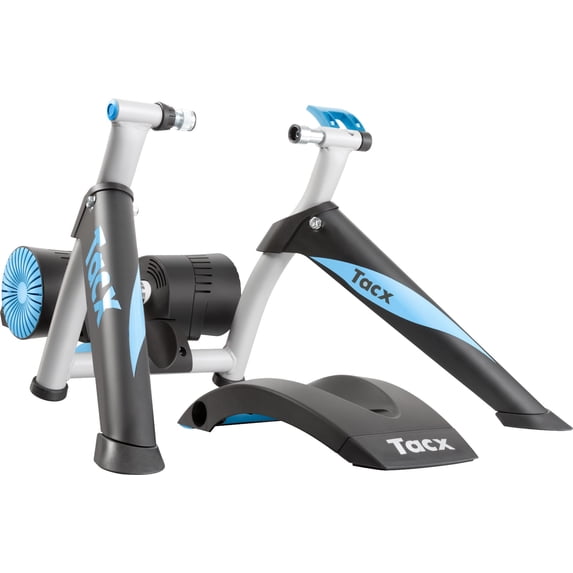
See how this setup fits your own priorities.
The finder uses documented setup and feature differences. It is not a compatibility guarantee; verify your exact frame, drivetrain and supplied package.