
Your needs, this model
Does it fit your priorities?
Can bikes with different cassette cog counts share this trainer?
The included single-speed Cog avoids swapping a cassette for every cog count, which can simplify a multi-bike setup. Wahoo says the Cog works with the great majority of 8–12-speed drivetrains, while the product page makes a broader 8–13-speed claim; check the exact drivetrain, especially for belt-drive or internally geared bikes, before relying on that range.
Explore this need in the finder →Will the included Click shift gears in my preferred training app?
Wahoo's virtual-shifting guide updated October 24, 2026 lists Zwift and ROUVY with compatible firmware and versions, but a separate CORE comparison article still says Click shifting works only on Zwift. Confirm current app support and controller pairing before buying for ROUVY; do not assume the Click shifts in other apps.
Explore this need in the finder →Can I use the bike's own shifters with the Cog?
This package uses a single-speed Cog. Wahoo instructs riders to leave the chain in a suitable gear and use the Click's virtual gears where supported rather than physically shifting while virtual shifting is enabled. If ordinary cassette shifting or broad app-independent gearing matters more, compare the CORE 2 cassette package instead.
Explore this need in the finder →This assessment covers the US KICKR CORE 2 package sold with a pre-installed Zwift Cog and a Zwift Click controller. It is a package-specific comparison based on manufacturer documentation, not a hands-on review.
What this version adds—and leaves out
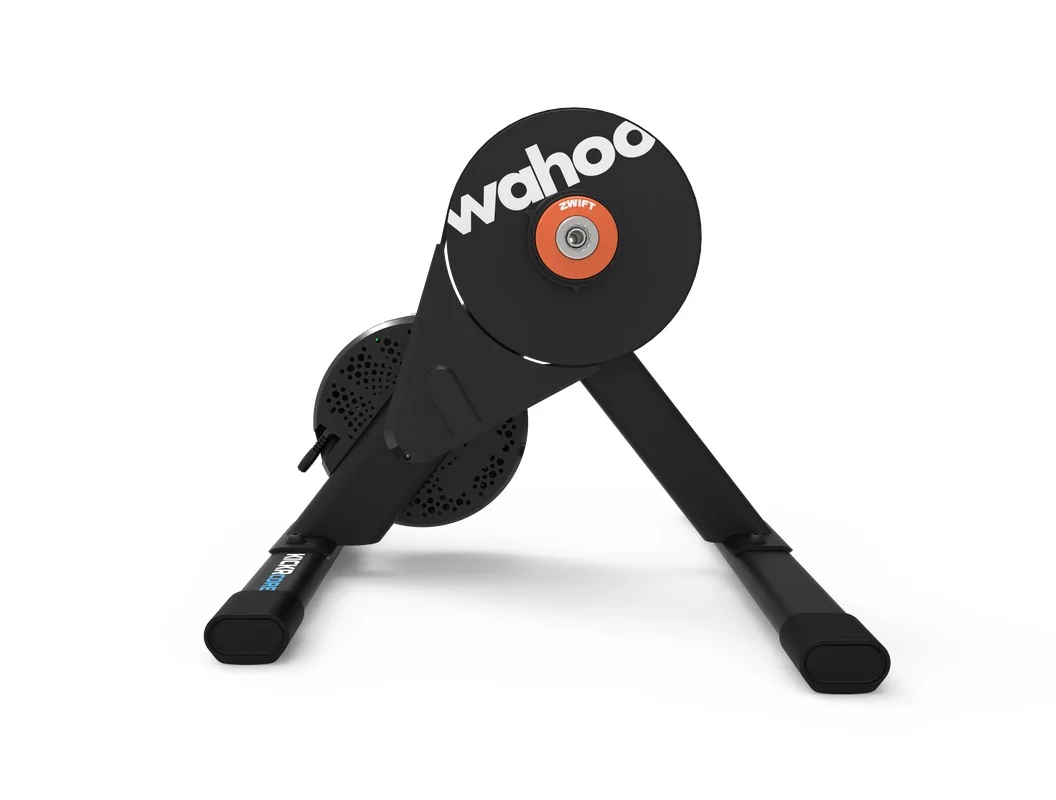
The CORE 2 is a direct-drive smart trainer: remove the bicycle's rear wheel, secure its rear axle to the trainer, and place the chain on the supplied Cog. This bundle replaces the cassette in Wahoo's separately listed cassette version with a single-speed, 14-tooth Zwift Cog and a two-button Bluetooth Click remote. Wahoo describes 24 virtual gears for the Click in supported riding software. Its CORE 2 FAQ identifies the trainer part number as WFBKTR125, but does not publish a distinct package code for this Cog-and-Click configuration; check the named package in the exact order listing rather than treating the base trainer number as unique to a bundle.
The main appeal is reduced cassette-specific setup. A household can move between otherwise compatible bikes with different cassette cog counts without swapping trainer cassettes or tuning the rear derailleur for a trainer-mounted cassette each time. That convenience is most relevant if virtual shifting is how you want to ride. It is not the same as keeping every bike's normal rear gears: the trainer has one Cog, so the included Click and compatible software take over virtual changes.
Virtual shifting is useful, but app-dependent
The bundled controller is not a universal shift remote. Wahoo's current virtual-shifting guide, updated October 24, 2026, lists Zwift and ROUVY, along with minimum app versions, supported trainer firmware and Bluetooth pairing requirements. Its separate CORE Cog-versus-cassette explanation still says the Click's virtual shifting works only on Zwift. Because Wahoo's own material differs on ROUVY, confirm current support before choosing the package specifically for that app. Do not assume shifting support in other cycling apps. A Cog may still be usable for compatible non-virtual-shifting or ERG workouts, but that leaves you with a single physical sprocket rather than ordinary gear changes.
The virtual gear sequence also changes how you access gearing. Wahoo describes a linear progression of 24 steps; it is not a copy of your bicycle's mechanical cassette and chainrings. If fast front-chainring changes, familiar shifter feel, or app-agnostic shifting matters more than sharing one trainer across several drivetrain counts, the cassette configuration is the more straightforward choice. The Cog has a stronger case when convenience and virtual shifting are priorities.
Compatibility needs more than a speed-count headline
The US product page says the package fits almost any 8–13-speed bicycle, but Wahoo's technical compatibility guidance and its CORE comparison describe the Cog as compatible with the great majority of 8–12-speed drivetrains, subject to exceptions. Those statements are not a universal fit guarantee. Wahoo calls out belt-driven bikes and internal gear hubs such as Shimano Alfine or Nexus as incompatible, names additional exceptions, and warns that some SRAM Flattop drivetrains may wear faster than with a normal wheel. This assessment therefore avoids turning the broader product-page claim into a blanket promise. Check the exact bike, chain and transmission with Wahoo's current drivetrain guidance.
Frame mounting is a separate check from Cog compatibility. Wahoo lists included adapters for 130/135 mm quick-release and 12 × 142/148 mm thru-axles, but its CORE frame-fit guidance says nominal hub standards do not prove that every frame fits. Some bikes have named restrictions or conditions. Confirm your bicycle's make, model, axle and clearance; do not force a frame onto the trainer or improvise with washers. The wheel still comes off, so this is not a choice for riders who need a wheel-on arrangement.
The trainer's headline performance is not a Cog advantage
Wahoo lists the CORE 2's electromagnetic resistance, ±2% power accuracy, 1,800-watt maximum output and simulated grades of +16% and −10%. These are manufacturer specifications for the CORE 2 platform, not measurements from an independent ride test. The product page lists ANT+, ANT+ FE-C, Bluetooth and Wi-Fi. Wahoo also includes the AC adapter and says the trainer needs power for resistance beyond flywheel inertia. Cog and Click change the supplied drivetrain interface and control method; Wahoo does not advertise them as an upgrade to the trainer's power or climbing limits.
There is an unresolved weight discrepancy worth keeping in mind if you'll carry the unit often: the product page says 30 lb (13.6 kg), while the CORE 2 support FAQ says 43.5 lb (19.7 kg) unboxed. Wahoo does not reconcile the basis on those pages, so this review does not choose one figure or present a carry-weight comparison.
Setup and purchase checks
Assembly includes attaching the color-coded feet and plugging in the supplied power adapter. Wahoo's CORE 2 setup instructions then have the rider remove the rear wheel, put the chain on the Cog, fit the correct hub adapters and secure the bicycle using its skewer or thru-axle. Wi-Fi setup and firmware updates are part of getting the trainer ready for software; virtual shifting additionally depends on the controller and app version.
Before ordering, verify that the listing is specifically the CORE 2 with Zwift Cog and Click, not the 11-speed cassette version or the separate Zwift Ride-only package. Confirm the bike has a supported rear hub and frame, check the Cog's drivetrain exclusions, and decide whether your preferred app currently supports virtual shifting with Click. If those points fit, the package offers a clearer route to virtual gears and mixed-bike use; if not, compare the cassette package or a different trainer style. This conclusion reflects published specifications and support instructions, not personal use or measured testing.
Key specifications
Key details at a glance
| Trainer setup | Direct-drive / rear wheel removed |
|---|---|
| App-controlled resistance | Yes |
| Manufacturer power accuracy | 2% |
| Manufacturer maximum resistance power | 1800 W |
| Maximum simulated uphill grade | 16% |
| Maximum simulated downhill grade | -10% |
| Cassette included in reviewed package | No |
| Zwift Cog and Click included in reviewed package | Yes |
| Pre-installed Zwift Cog tooth count | 14 teeth |
| Manufacturer-documented virtual-shifting apps | Zwift / ROUVY |
| Manufacturer-stated virtual gear steps | 24 steps |
| Listed connection protocols | ANT+ / ANT+ FE-C / Bluetooth / Wi-Fi |
| Listed ride metrics | power / speed / distance / cadence |
| Manufacturer maximum rider weight | 250 lb |
| Listed rear hub standards | 130 mm quick release / 135 mm quick release / 12 x 142 mm thru axle / 12 x 148 mm thru axle |
| AC power adapter included | Yes |
| Mains power required for powered resistance | Yes |
Use the exact model’s instructions for operating limits, supplied equipment and version differences.
Sources for this review
Sources for this assessment
- KICKR CORE 2 with Zwift Cog and Click — Wahoo US
- KICKR CORE 2 Smart Trainer Information & FAQ
- Why choose CORE with Zwift Cog vs cassette?
- Drivetrain Compatibility for KICKR, CORE, and MOVE trainers
- Bicycle Frame Compatibility [CORE]
- Set up your KICKR CORE 2 Smart Trainer
- Virtual shifting with Wahoo smart trainers
See how this setup fits your own priorities.
The finder uses documented setup and feature differences. It is not a compatibility guarantee; verify your exact frame, drivetrain and supplied package.