
Your needs, this model
Does it fit your priorities?
Does the Tacx Boost keep the bicycle's rear wheel installed?
Yes. The 010-02419-01 Boost is a wheel-on trainer: the bike's rear tire contacts the resistance roller and the rear wheel remains on the bicycle. Check the actual tire and axle against Garmin's setup guidance before relying on broad size labels.
Explore this need in the finder →Can an app automatically change the Boost's resistance?
No automatic resistance control is documented. Garmin describes ten positions selected by a handlebar lever. A speed sensor can provide data to supported apps, but speed-derived virtual power is an estimate and does not move the magnetic brake for a route or ERG workout.
Explore this need in the finder →Does base part 010-02419-01 include a speed sensor or trainer cassette?
The U.S. base listing is separate from the 010-02419-02 sensor bundle. The base is a wheel-on unit with no trainer cassette or Zwift Cog/Click, and the product image's nearby speed sensor is not evidence that it comes in this box. Verify the exact seller's contents.
Explore this need in the finder →The Garmin Tacx Boost base part 010-02419-01 is a manually adjusted, wheel-on magnetic trainer. It keeps the bicycle's rear wheel installed and presses the tire against a resistance roller. Garmin describes ten handlebar-selected resistance positions and operation without mains power. This is a source-based product assessment, not a ride test, ownership report or prediction of fit on a particular bicycle.
Base Boost is not the speed-sensor bundle
Garmin's U.S. category and launch materials distinguish the Tacx Boost trainer from a separate speed-sensor bundle. A U.S. retailer listing identifies the base offer as part 010-02419-01; the separate U.S. bundle listing identifies 010-02419-02. That distinction matters because one product photo shows a speed sensor beside the trainer, but the sensor is not included with the base configuration assessed here. The base listing also does not include a trainer cassette or Zwift Cog and Click. The rear wheel and the bicycle's own drivetrain stay on the bike, so this is different from a wheel-off direct-drive setup that needs a freehub-mounted package.
Manual resistance, not app-controlled braking
The Boost's resistance lever selects among ten magnetic positions. Garmin describes the trainer as unpowered, so the rider changes resistance at the handlebar rather than asking an app to set a route gradient or ERG target. Pairing a separate speed sensor may let supported software display speed, distance or estimated virtual power, but telemetry does not make the brake smart. Garmin's manual explains that virtual power is estimated from wheel speed and a trainer power curve; it is not a direct measurement by a power meter. The manufacturer's 1,050 W maximum is a stated trainer capability, not an independent test, and there is no documented simulated-grade percentage in the reviewed sources.
Check the wheel, tire and axle against the setup instructions
Garmin's manual includes three wheel-diameter adjustment positions. It gives approximate measured wheel-with-tire bands of 610–650 mm for position 1, 640–680 mm for position 2 and 660–720 mm for position 3. Those bands overlap: measure the actual wheel as instructed and follow the manual's adjustment procedure rather than selecting by a nominal “26-inch” or “29-inch” label alone. The official regional product page lists 130 and 135 mm rear-fork spacing and Garmin says other adapters exist, but the exact U.S. seller's complete adapter inventory is not established. Confirm axle type, frame spacing, tire width and tire condition for the actual bicycle before buying. A tire needs to contact the roller correctly; observe the bicycle and tire makers' instructions and pressure limits.
Plan for a compact but not tiny footprint
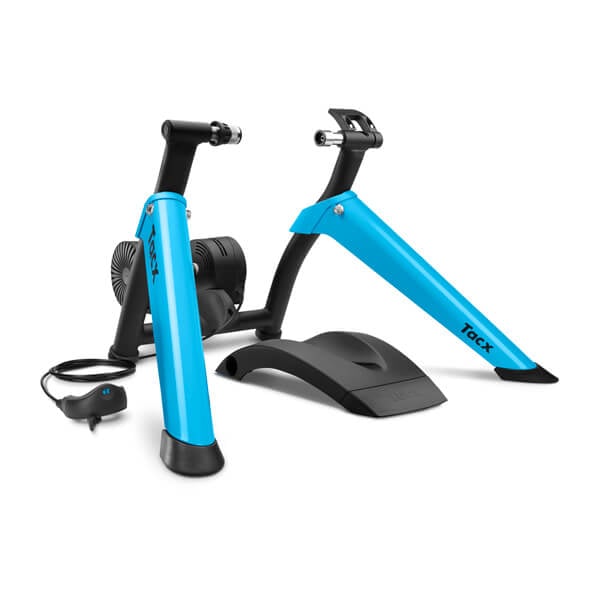
Garmin lists an operating footprint of 675 by 650 mm and folded dimensions of 565 by 410 by 245 mm for the shared Boost model, with a listed mass of 8.5 kg and a 1.6 kg flywheel. Leave additional room for the bicycle, mount and safe dismount; folded dimensions do not describe the space needed while riding. The exact-model picture is useful for identifying the blue trainer and front-wheel support. It also shows a separate speed sensor, so it is not a base-box inventory image or proof that the sensor is included.
What the sources settle—and what they do not
The U.S. retailer listing and Garmin's regional official page connect the base model to part 010-02419-01. Garmin's U.S. category reader also names Boost, but the U.S. interactive catalogue's total and terminal pagination remain unresolved. The retrieved U.S. retailer page does not establish current or future stock, seller warranty terms or a complete box list. The published shared-model dimensions and manual are useful for setup planning, but do not replace confirmation of the exact U.S. offer. No current price, stock, noise measurement, rider experience, app compatibility guarantee or individual-bike fit is asserted here.
Consider this base package if you want a simple, unpowered wheel-on trainer with a manual resistance lever and no need for app-controlled braking. Compare the separate 010-02419-02 bundle if an included speed sensor is useful, remembering that its data capabilities do not change the trainer's manual resistance. Before ordering, verify the exact part number, package contents, wheel and axle compatibility, setup instructions, seller terms and availability directly. Neither the base nor bundle listing should be mistaken for a direct-drive trainer, a trainer cassette or a Cog-and-Click package.
Key specifications
Key details at a glance
| Trainer setup | Wheel-on / rear tire on |
|---|---|
| App-controlled resistance | No |
| Manufacturer maximum resistance power | 1050 W |
| Cassette included in reviewed package | No |
| Zwift Cog and Click included in reviewed package | No |
| AC power adapter included | No |
| Mains power required for powered resistance | No |
| Manual resistance levels | 10 levels |
Use the exact model’s instructions for operating limits, supplied equipment and version differences.
Sources for this review
Sources for this assessment
- Tacx Indoor Bike Trainers — Garmin U.S. category search-reader extract
- Cyclists can take their ride inside with the Tacx Boost — Garmin U.S. newsroom
- Tacx Boost Owner's Manual — Garmin
- Tacx Boost — Garmin Malaysia official product page
- Tacx Boost Trainer — BIKEFACTORY Hawaii U.S. retail listing
- Tacx Boost model image — Garmin

See how this setup fits your own priorities.
The finder uses documented setup and feature differences. It is not a compatibility guarantee; verify your exact frame, drivetrain and supplied package.